Building Agentic AI-Powered Digital Twins for Manufacturing Operations
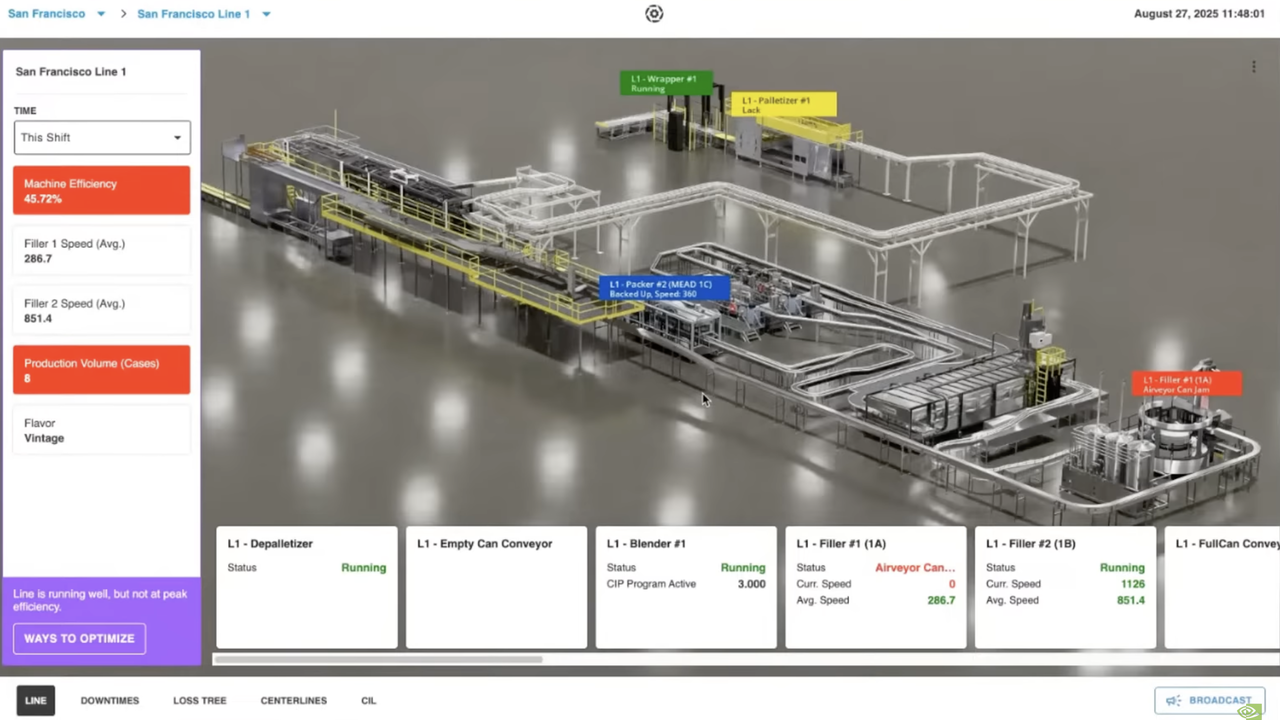
The manufacturing shop floor has always suffered from a hard truth: the people who need to make decisions rarely have the full picture. Data lives in silos, dashboards are two-dimensional, and understanding where a problem is happening often means physically walking the line. In a recent NVIDIA OpenUSD Insiders live stream, engineers from Sight Machine, Kinetic Vision, Microsoft, and NVIDIA walked through a working system that attacks this problem head-on: an agentic AI-powered digital twin that fuses live production data with a photorealistic, browser-streamed 3D model of an entire bottling line.
This article breaks down what they built, the architecture underneath it, and the practical pipeline for turning a physical factory into a live, decision-making digital twin.
Why digital twins, and why now
A digital twin is only useful if it changes a decision. As the panel put it, the goal isn’t a pretty 3D model — it’s turning every person on the shop floor into a decision-maker who can respond to changing line conditions with data-backed recommendations. The headline manufacturing KPIs are familiar: increase line throughput, hold schedule adherence, maximize machine efficiency and availability, and cut unplanned downtime.
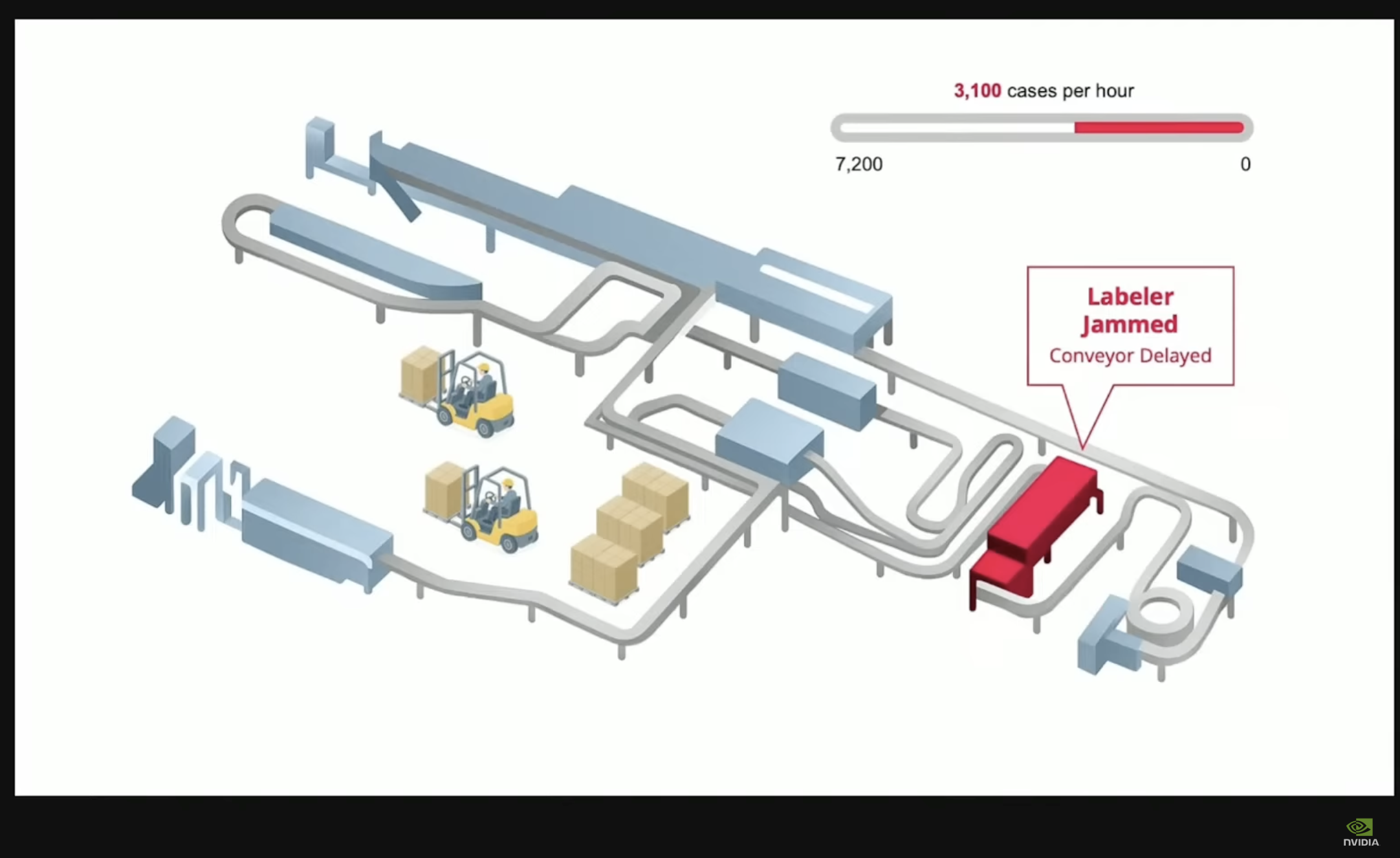
A single fault ripples across the line — a jammed labeler delays the conveyor and drags throughput down to 3,100 of a possible 7,200 cases per hour. The core problem a digital twin exists to catch.
What makes the current generation different is the convergence of three things: OpenUSD as a common 3D data format, cloud GPU streaming that puts a photorealistic twin on any browser, and agentic AI that doesn’t just visualize the past but recommends the next action. NVIDIA frames this as part of the broader shift toward physical AI — AI systems that perceive, reason about, and act on the physical world.
Crucially, the panel emphasized this is a brownfield story. These are existing bottling lines with PLCs and systems deployed over many years. The digital twin is an additive layer on top of that stack, not a rip-and-replace.
The manufacturing use cases
The live demo centered on a bottling line, and the use cases mapped directly to what operators do every day.
Real-time performance monitoring and visualization. The twin provides a single, immersive 3D view of the whole line. Operators see machine status, filler speed, production volume, machine efficiency, and even which flavor is running — without walking the line or stitching together partial information. Live metrics render on the left of the application, per-asset attributes at the bottom, and the same data appears as billboards floating above each machine inside the streamed 3D scene.
Fault detection and root-cause analysis. When a machine faults — a filler, in the demo — the system doesn’t just flag it in a table. It zooms into the asset and highlights the specific failing component in red, in this case a conveyor/airveyor jam, pinpointing exactly where the operator needs to focus. This is only possible because the USD asset is segmented into components, so live data can be mapped to an exact physical location.
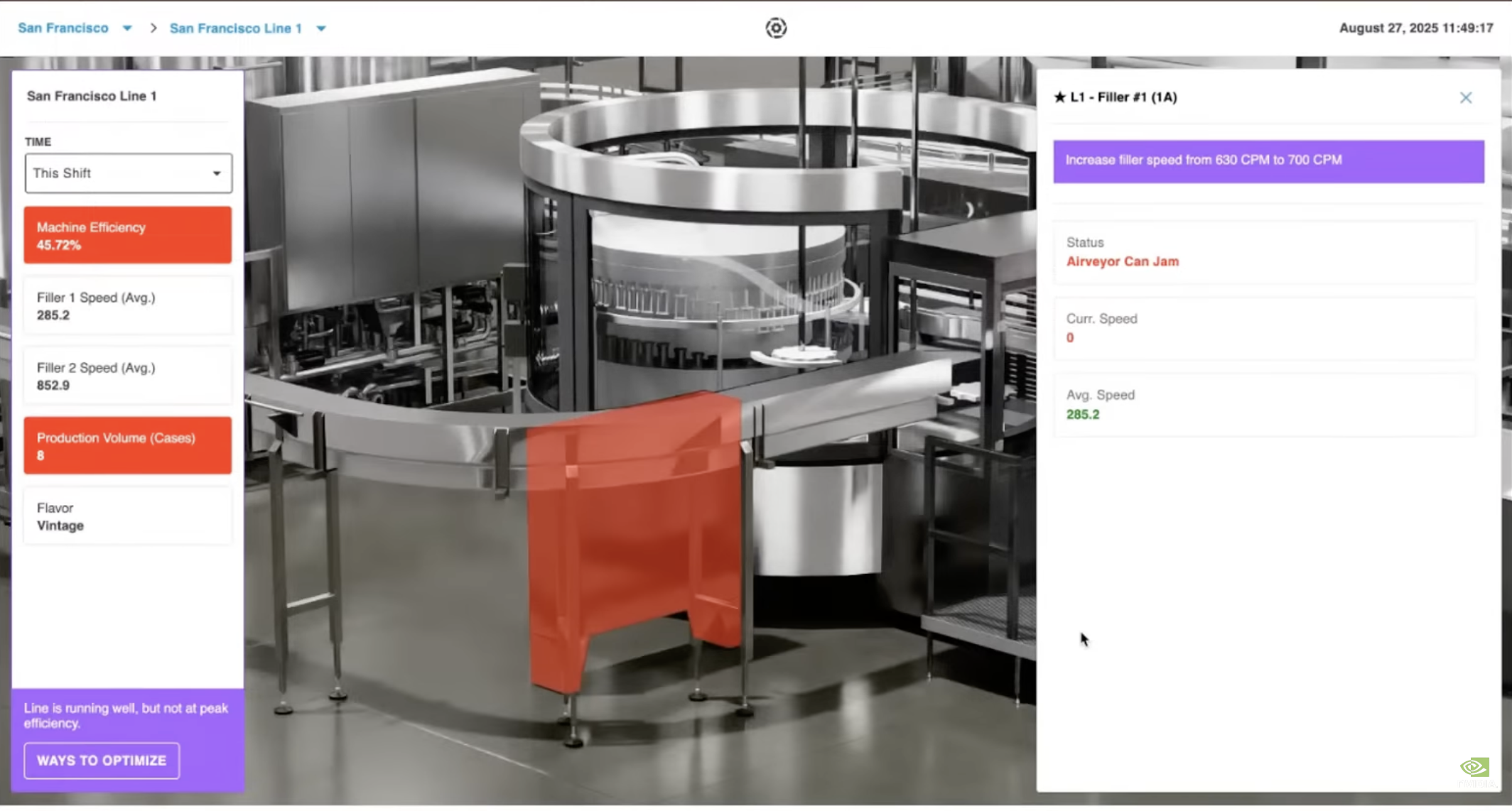
Drill-down on “L1 – Filler #1”: the faulting component is highlighted in red (Airveyor Can Jam), while the agentic engine surfaces a concrete recommendation — increase filler speed from 630 to 700 CPM.
Proactive maintenance and optimization recommendations. The agentic AI engine surfaces issues before they escalate. Examples from the session: recommending the filler speed be adjusted from 630 to 700 CPM to increase throughput, or notifying an operator to replace packaging material ahead of time to avoid an unplanned stop. The recommendations are generated under varying line conditions and delivered at the point of consumption — layered directly onto the 3D view.
“What-if” scenario modeling. Because the twin is physically accurate, teams can simulate changes without touching the real line: add a machine, change raw materials, and predict how capacity and efficiency shift. The panel’s example — “if you add another machine, you can reduce or eliminate weekend shifts” — is exactly the kind of risk-free experiment that justifies the investment.
Data-driven decision-making. Combining live data with 3D context is what turns shop-floor personnel into decision-makers. The same single pane of glass serves both live operations and simulation/what-if analysis.
The reference architecture
The foundation is a reference architecture that Microsoft and NVIDIA developed together and demonstrated at Microsoft Ignite. It’s published as an Azure Arc Jumpstart guide and public GitHub repo, so ISVs like Sight Machine can implement it in their own Azure tenant.
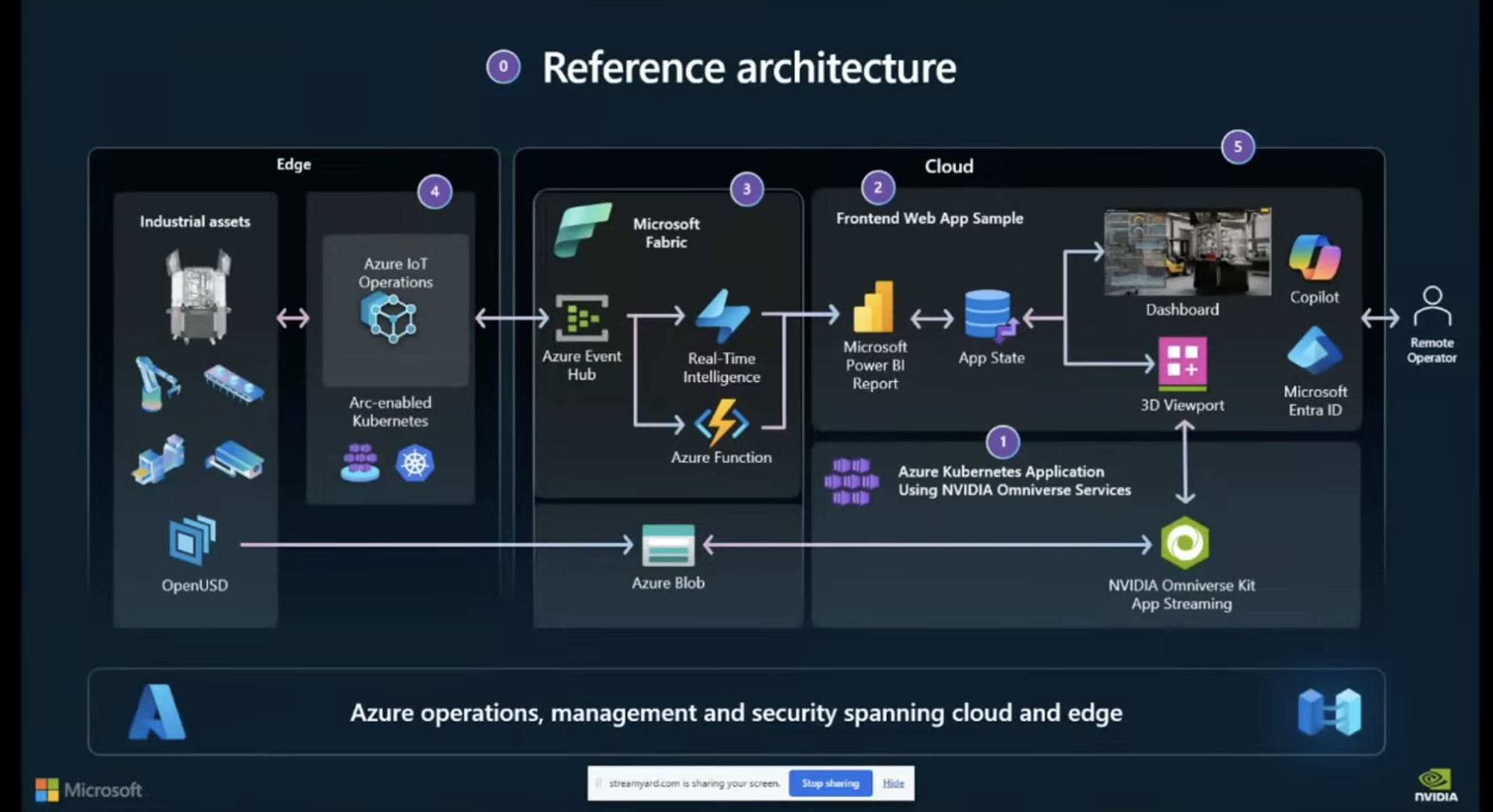
The NVIDIA + Microsoft Azure Operations Twin reference architecture, spanning edge (industrial assets, Azure IoT Operations, Arc-enabled Kubernetes, OpenUSD) and cloud (Microsoft Fabric, Power BI, App State, 3D Viewport, and NVIDIA Omniverse Kit App Streaming).
The data flow, end to end, looks like this:
- Edge acquisition. Sight Machine’s systems harvest data from the shop floor. Azure IoT Operations orchestrates edge telemetry from the plant floor and smart buildings.
- Cloud ingestion. Telemetry streams to the cloud via Azure Event Hubs and event streams in Microsoft Fabric.
- Standardized data models. Sight Machine processes the raw streams into standardized data models that represent the entire line end to end — the semantic layer that makes the data meaningful.
- AI services. Leveraging Azure AI services, Sight Machine generates effective insights, including the agentic recommendations shown in the demo.
- 3D rendering and streaming. OpenUSD assets are managed in Azure Blob storage and rendered via NVIDIA Omniverse Kit App Streaming, deployed on Azure Kubernetes Service (AKS) with NVIDIA RTX GPUs (the session referenced A10 GPUs on Azure). This horizontally scales GPU-accelerated rendering to remote operators.
- The client. An interactive operations twin — a 3D viewport embedded alongside analytics — is delivered to any device with a Chromium-based browser.
How Sight Machine built it
The panel broke the implementation into four layers.
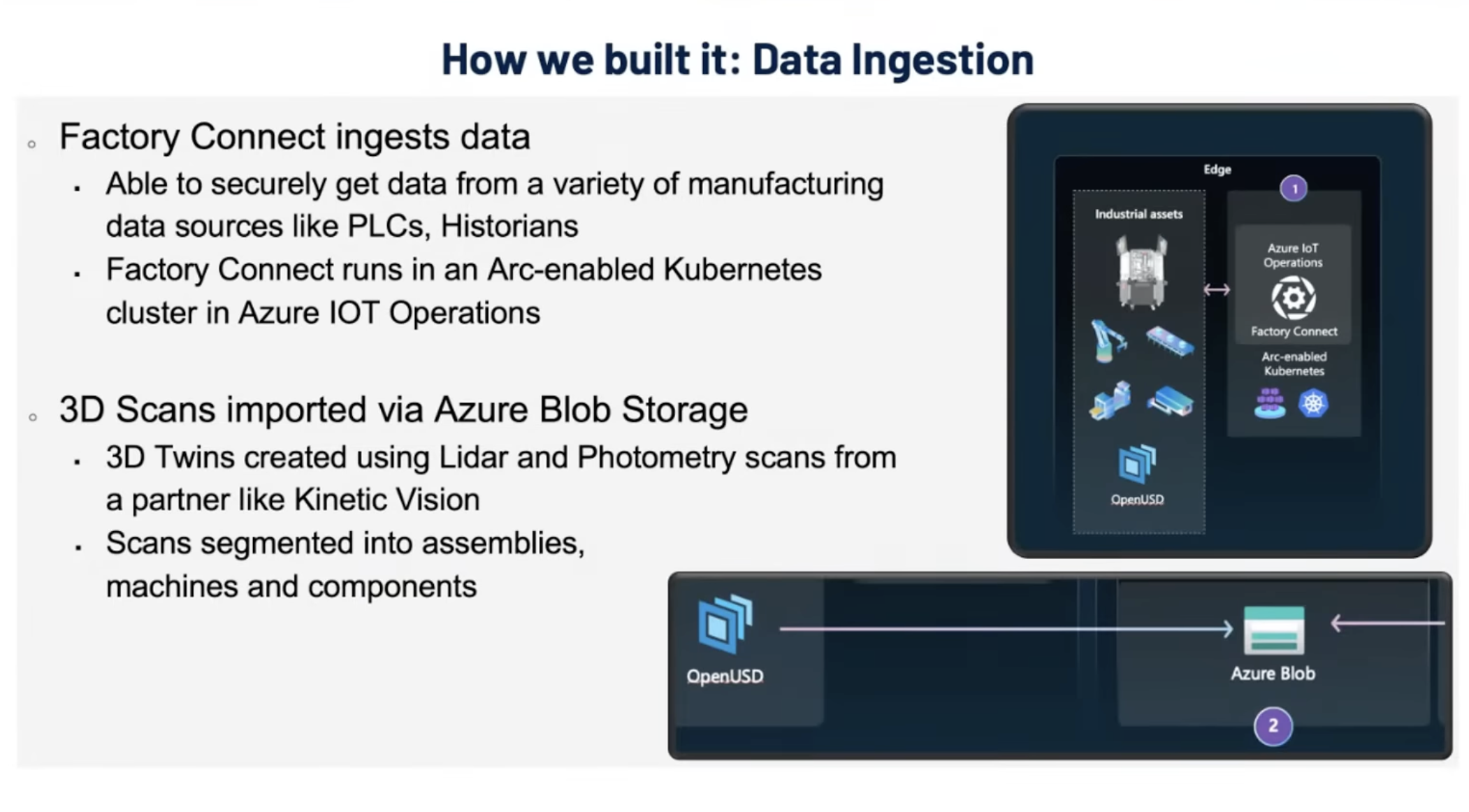
Data ingestion. Sight Machine’s Factory Connect securely pulls data from a variety of manufacturing sources — PLCs, historians — running inside an Arc-enabled Kubernetes cluster in Azure IoT Operations. In parallel, 3D scans produced by a partner like Kinetic Vision are imported via Azure Blob storage as OpenUSD, segmented into assemblies, machines, and components.
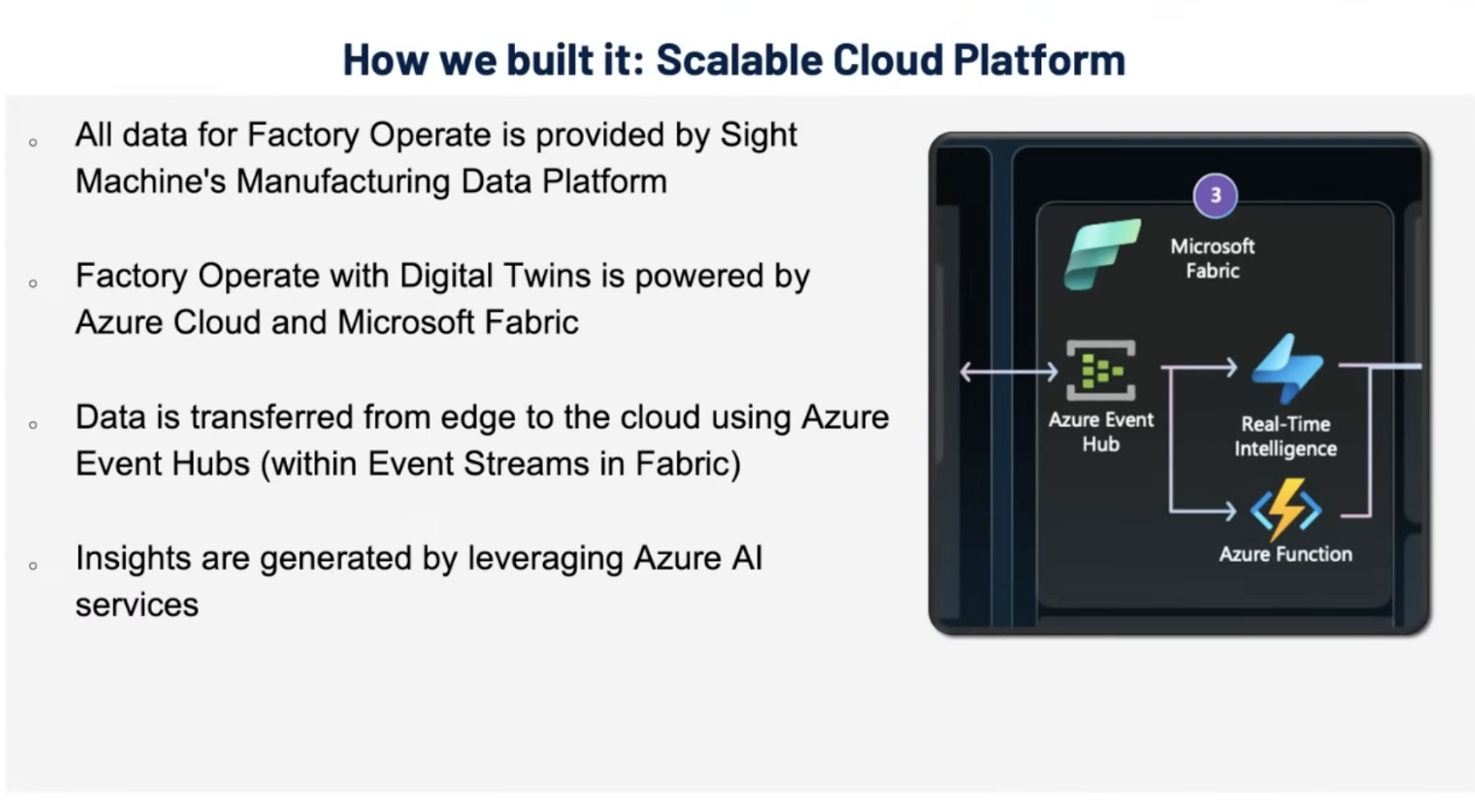
Scalable cloud platform. All data for Factory Operate is provided by Sight Machine’s manufacturing data platform, powered by Azure Cloud and Microsoft Fabric. Data moves edge-to-cloud through Azure Event Hubs (within Event Streams in Fabric), and insights are generated by Azure AI services.
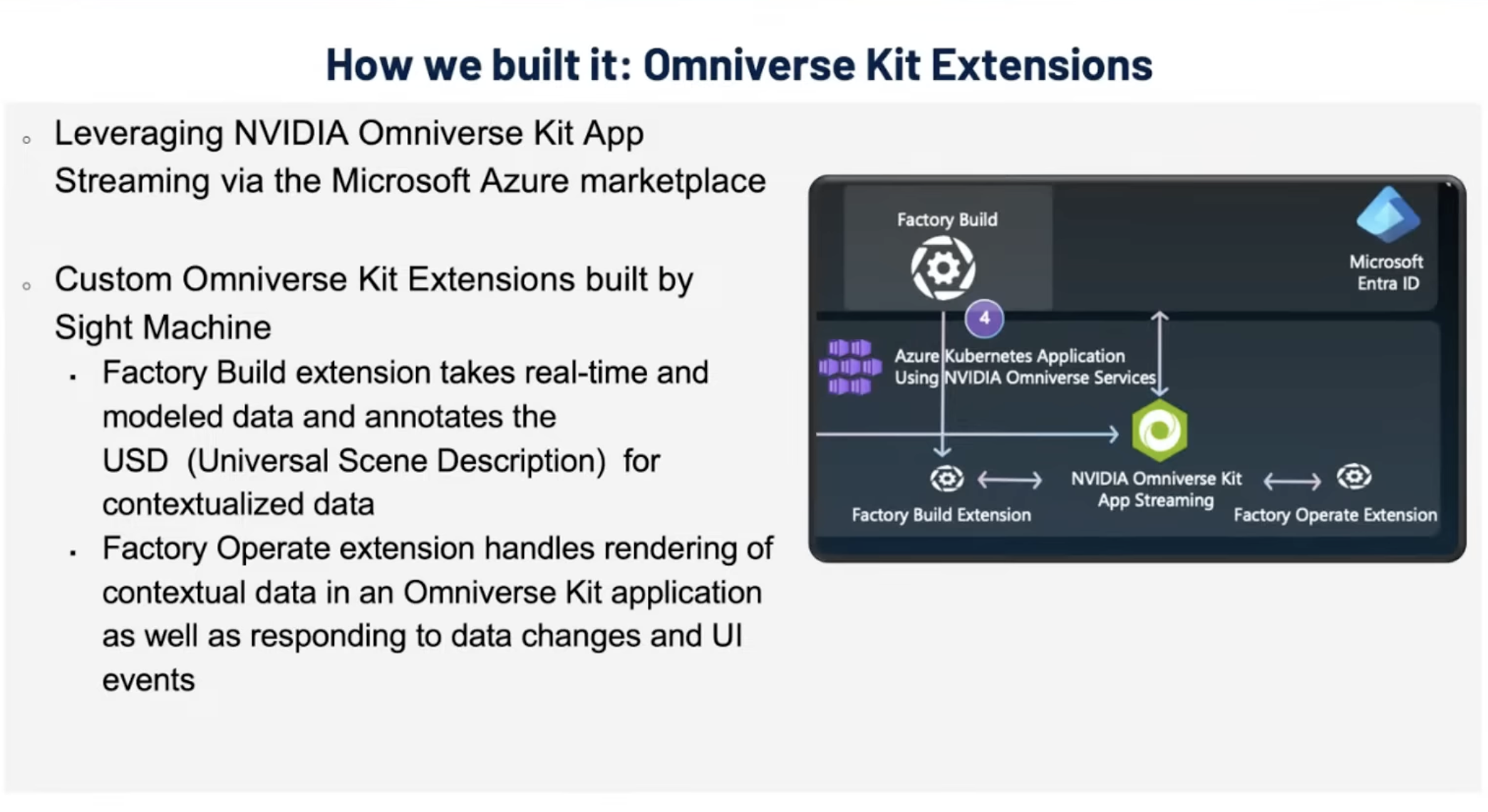
Omniverse Kit extensions. Two custom Omniverse Kit extensions tie the data to the visuals. The Factory Build extension takes real-time and modeled data and annotates the USD to produce contextualized twins (for example, attaching filler speed to a specific machine). The Factory Operate extension handles rendering that contextual data inside the Omniverse Kit application — drawing the billboards above each asset and responding to data changes and UI events.
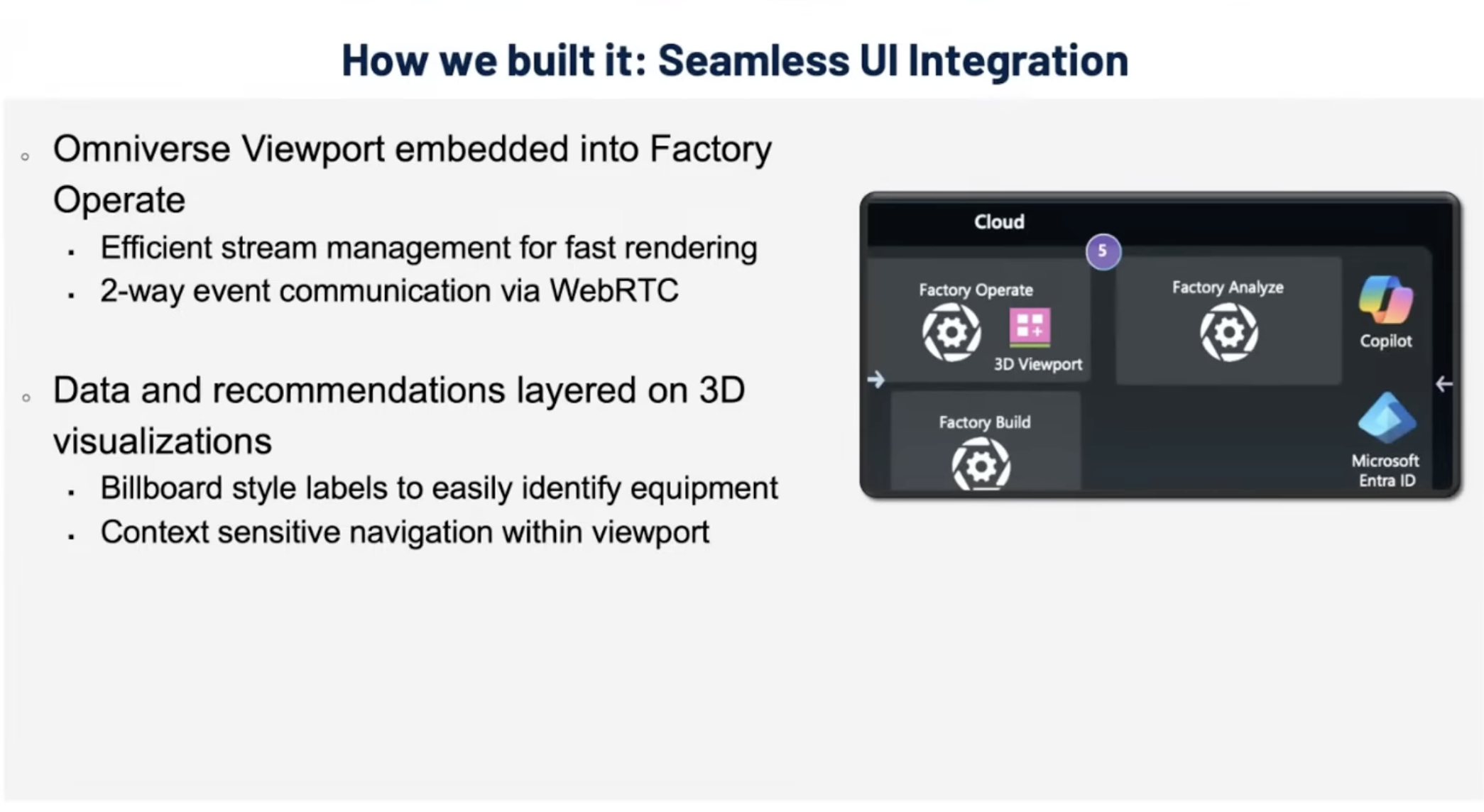
Seamless UI integration. The Omniverse viewport is embedded directly into Sight Machine’s Factory Operate web app, with efficient stream management for fast rendering and two-way event communication over WebRTC. Data and recommendations are layered onto the 3D visualization as billboard-style labels, with context-sensitive navigation inside the viewport.
Because the whole thing is built on the Ignite reference repo and Omniverse Kit App Streaming is available as a co-sell-ready listing on the Azure Marketplace, the panel’s point was blunt: a developer can go to the Azure Marketplace today, follow the GitHub repo, deploy the Kit App Streaming containers on their own Kubernetes cluster, and build the same front-end web integration.
Creating the 3D asset: Acquire, Activate, Optimize
A live operations twin is only as good as its 3D asset. Kinetic Vision described a deliberately simple, layered framework for producing them without disrupting operations — Acquire, Activate, Optimize (and finally Collaborate) — designed to meet customers wherever they are, since many aren’t ready for a full-blown twin on day one.
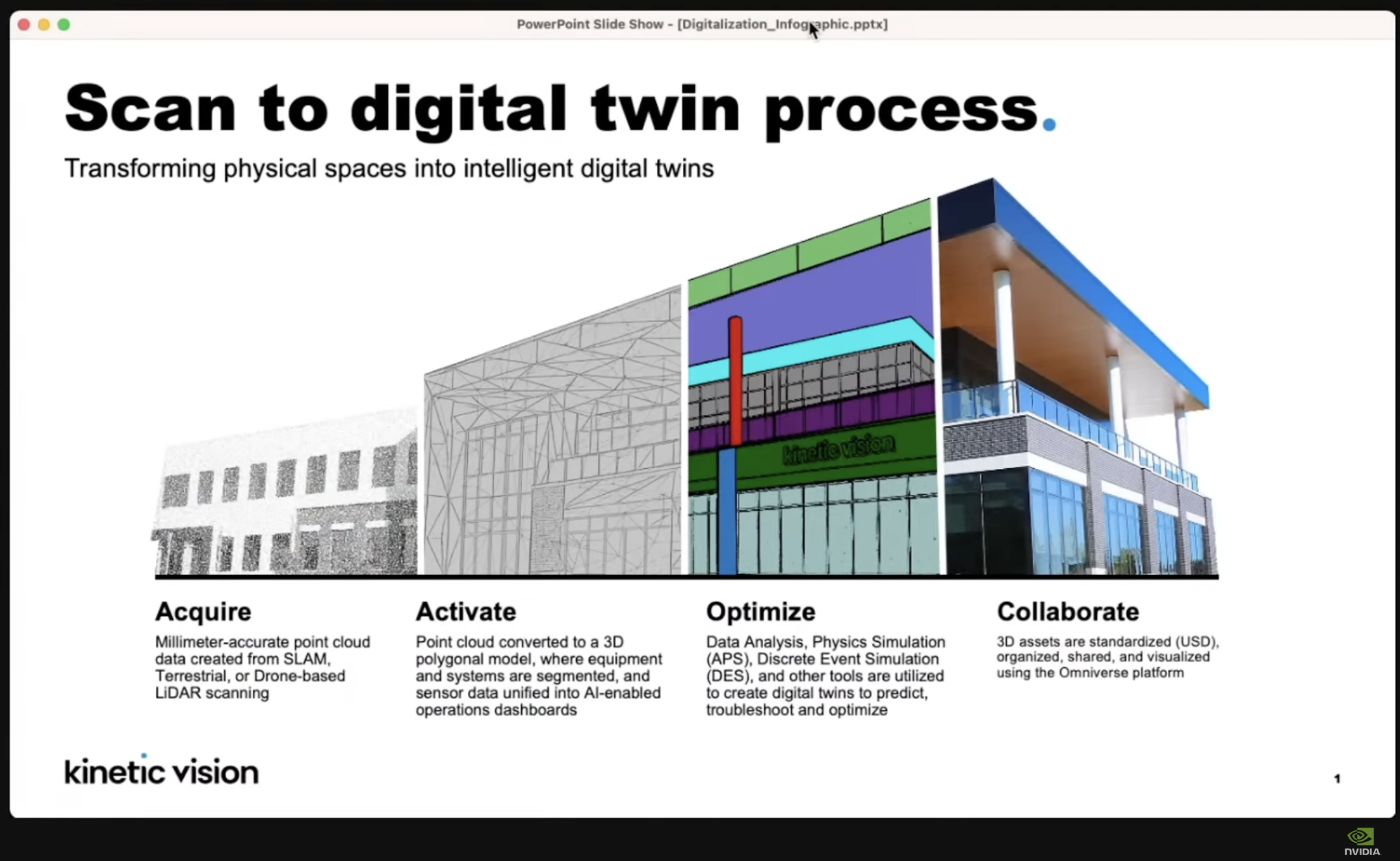
Kinetic Vision’s scan-to-digital-twin process, transforming physical spaces into intelligent digital twins.
- Acquire — Data collection. Most companies don’t actually have a handle on their spatial data. The first step is capturing the physical state of the facility quickly and accurately with 3D scanning, using LiDAR from SLAM, terrestrial, or drone-based platforms to produce millimeter-accurate point clouds.
- Activate — Turn the raw scan into a usable digital representation. The point cloud is converted to a 3D polygonal model where equipment and systems are segmented, and sensor data is unified into AI-enabled operations dashboards.
- Optimize — Use the twin to improve performance. Through data analysis, physics simulation (APS), discrete event simulation (DES), and other tools, operators predict, troubleshoot, and optimize.
- Collaborate — 3D assets are standardized as USD, organized, shared, and visualized on the Omniverse platform so all stakeholders work from the same model.
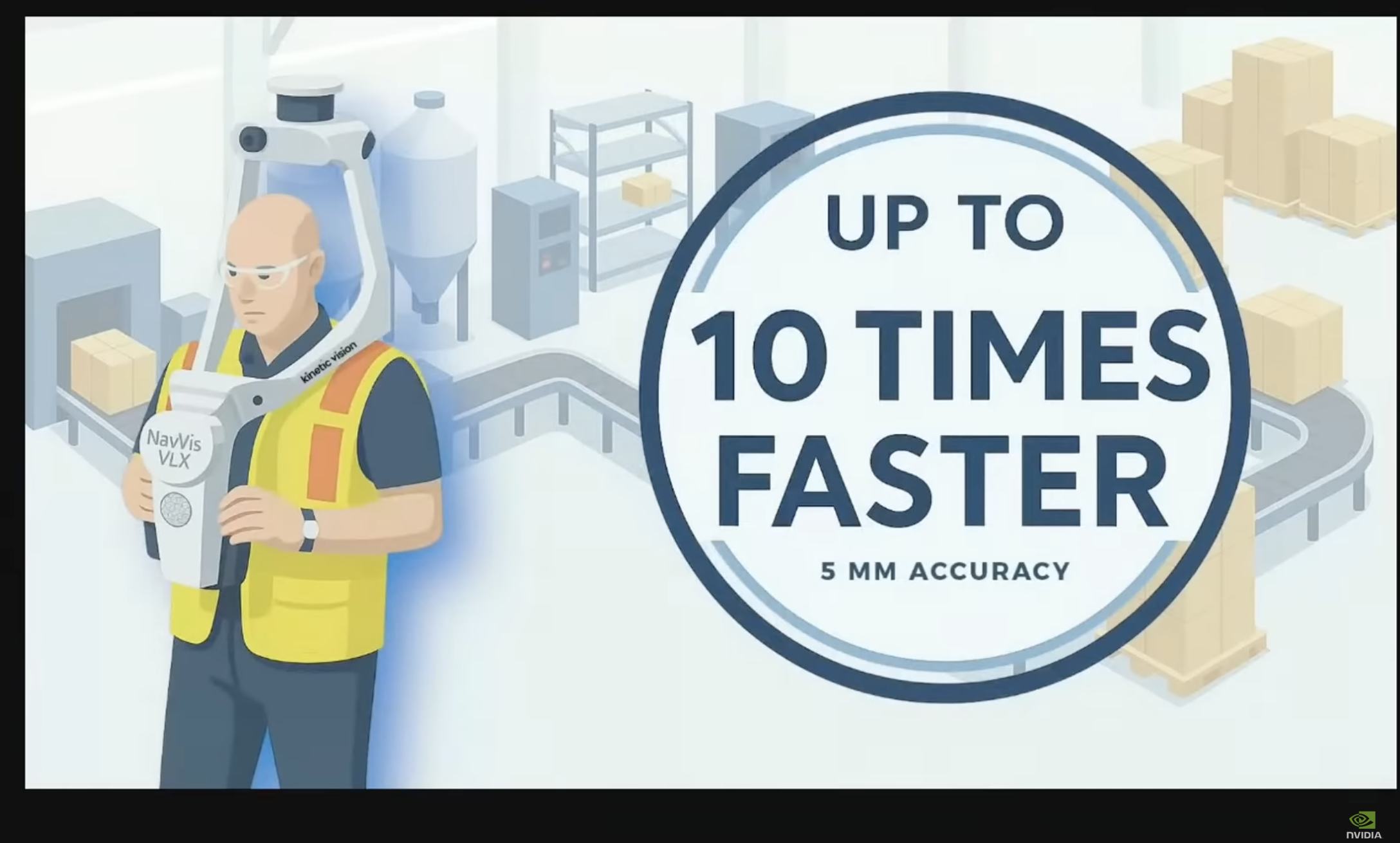
The Acquire step in practice — wearable LiDAR (e.g., NavVis VLX) captures a facility up to 10x faster than terrestrial methods at ~5 mm accuracy.
A recurring theme: air toward immersiveness whenever you can do it without friction. We’re human — being inside the twin produces better decisions than reading a table. The exception is when data is so complex or noisy that immersion adds friction rather than removing it; then a simpler representation wins.
The asset pipeline
The full asset pipeline the team demonstrated is a USD-formatted workflow for Omniverse SDK apps: 3D scan → reality capture → 3D DCC → Kit App USD streaming.
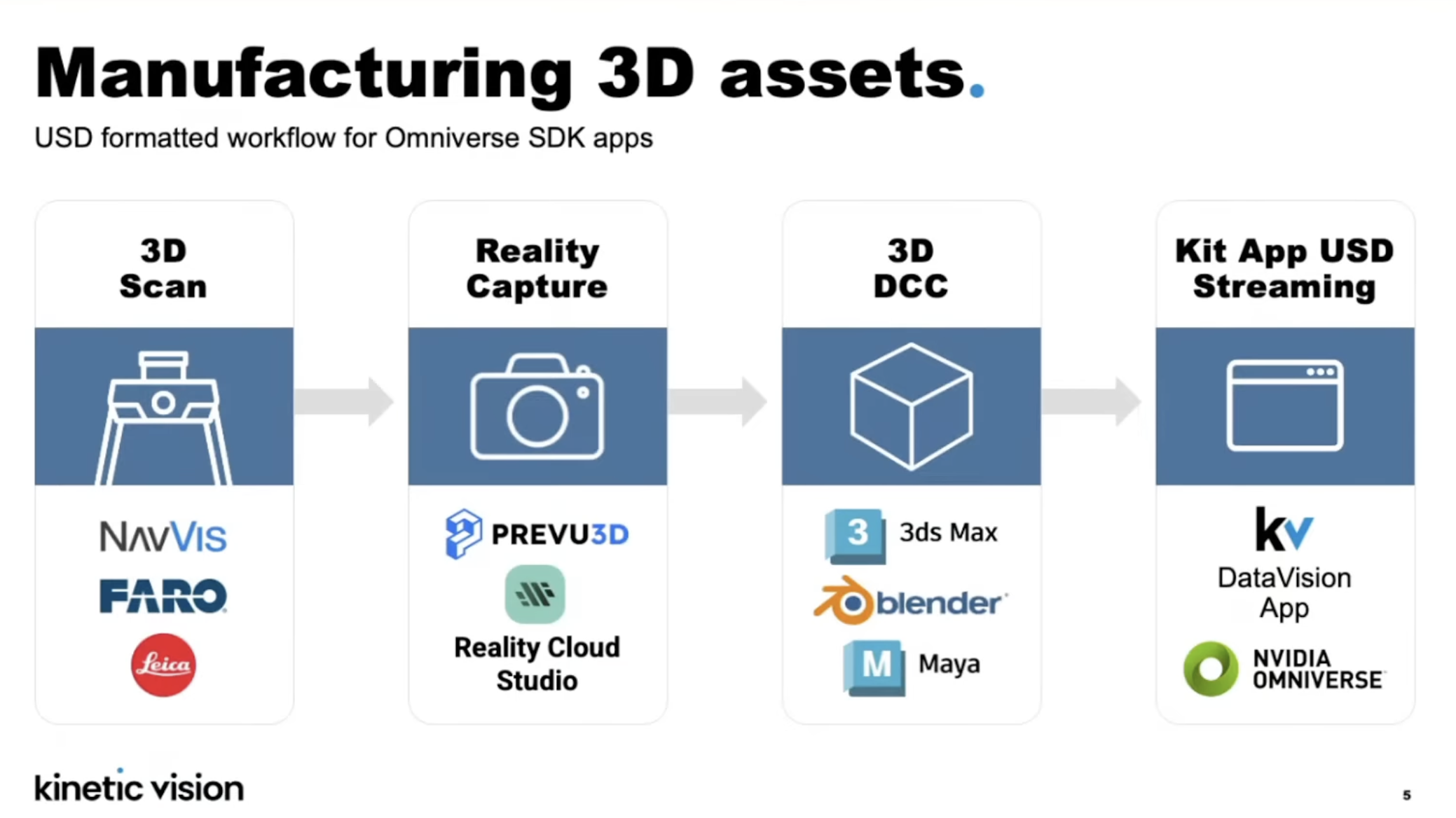
The USD-formatted asset pipeline, from scan to browser-streamed Kit app.
- 3D scan: NavVis, FARO, Leica. NavVis scanners are fast walking scans down to ~5 mm accuracy capturing millions of points; FARO and Leica are more precise terrestrial (tripod) scans.
- Reality capture: PREVU3D, Reality Cloud Studio (with other NVIDIA partners for measurements and panoramas).
- 3D DCC: standard content-creation tools — 3ds Max, Blender, Maya — where technical artists build the final asset, ideally alongside subject-matter experts.
- Kit App USD streaming: the high-fidelity, interactive USD is authored using the Omniverse SDK (which also lets the team layer in the extra data hooks Sight Machine’s platform needs) and streamed to the browser.
A point the Kinetic Vision team pressed repeatedly — this is as much a people problem as a technology one. Building a faithful twin of a filler requires collaborating with the person who sold or operates that filler. The soft skills of assembling and coordinating a multidisciplinary network of experts are as decisive as the hard skills.
How high-fidelity does the model need to be?
The panel drew a useful distinction between two twin “journeys” that run in parallel:
- An operational digital twin for live monitoring and agentic recommendations, where high — but not extreme — fidelity is enough.
- A simulation digital twin for animations, realtime playbacks of how a fault developed, and physics-based analysis, where a more realistic representation is essential.
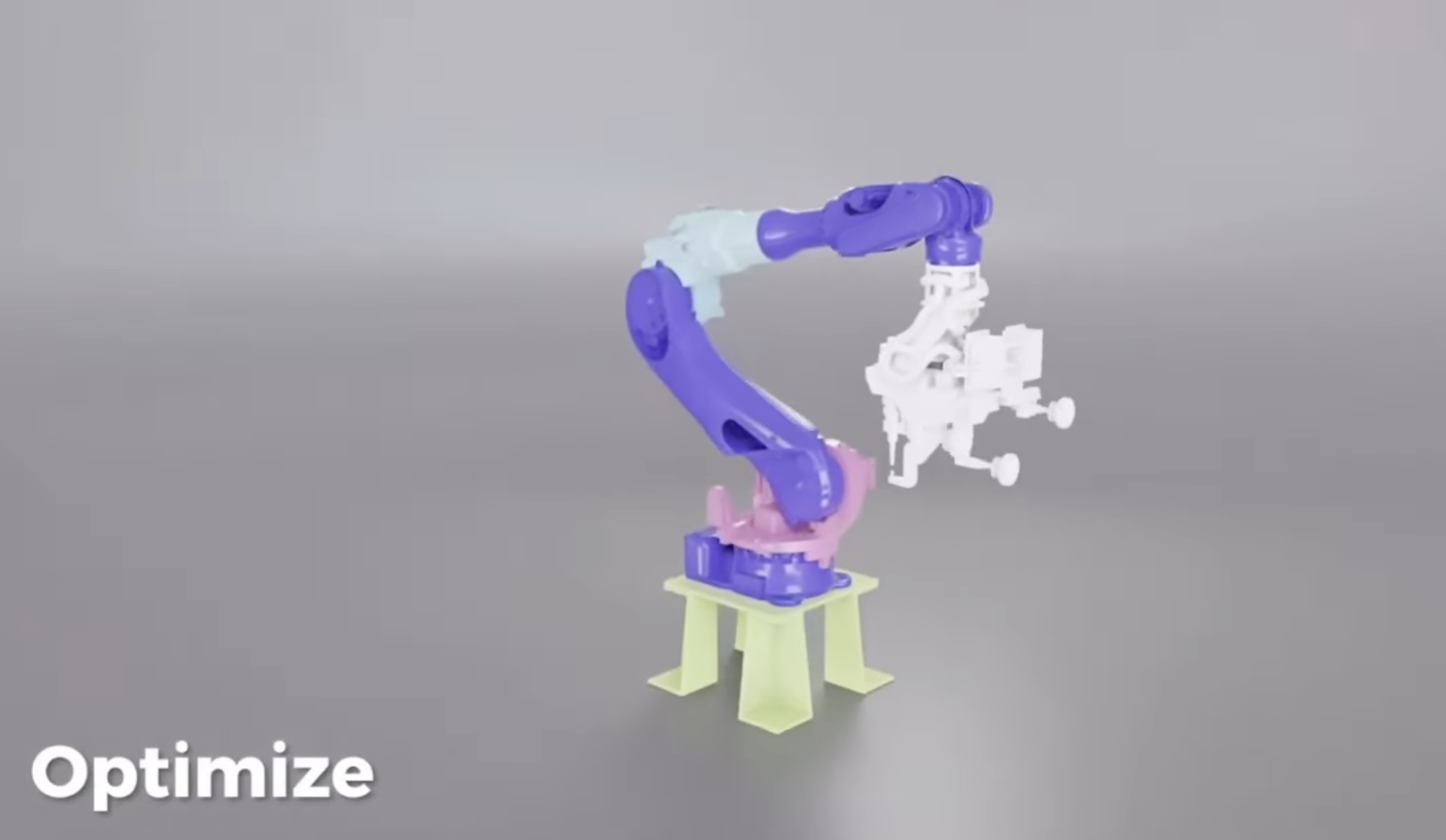
Component-level segmentation of a scanned asset — the same segmentation that lets live data pinpoint a fault to an exact part.
At the asset level, the most expensive machine on a bottling line — the filler, followed by the packer — is a strong candidate for dedicated simulation. You can’t stop a filler to run experiments, so CFD-style fluid-level and spillage simulations run against the twin instead, often in partnership with a specialized third-party simulation provider. As the team put it, it’s a team play: bring the right ingredient for the right job rather than expecting one tool to do everything.
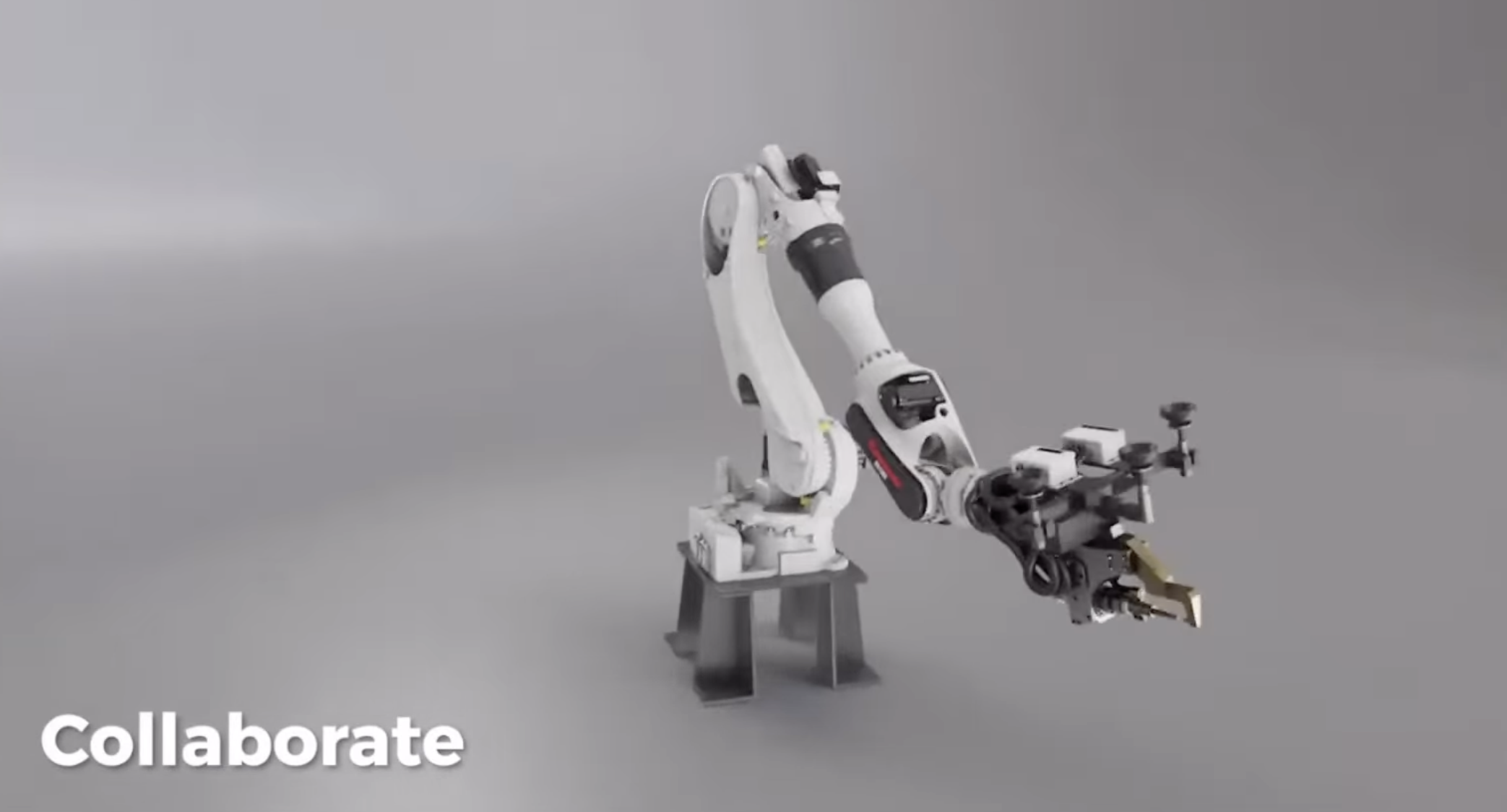
The Collaborate stage — a photorealistic, animated USD asset. Photorealism is a communication decision: it broadens who can understand and act on the twin.
On photorealism specifically: think of it as a communication decision. Engineer-to-engineer, you may not need it to change a variable. But when you’re asking leadership to open a budget for a major investment, photorealistic output broadens who can collaborate and understand the decision.
What this means for developers
A few practical takeaways from the session:
- Start from the business KPI, then a single use case. Look at your existing technology stack, find the gap, and adopt to the right level rather than throwing everything out. Prove incremental gains, then expand from one line to many lines, one factory to many.
- The reference architecture is real and reusable. The Microsoft/NVIDIA Azure Operations Twin GitHub repo and Azure Arc Jumpstart guide are the starting point; Omniverse Kit App Streaming is available on the Azure Marketplace.
- OpenUSD is the connective tissue. Segmenting the USD into components is what lets live data pinpoint a fault to an exact physical location — the difference between “a machine is down” and “this conveyor is jammed.”
- CUDA is foundational but invisible. Every accelerated operation here — neural network training and inference, the scene graph, the rendering — sits on CUDA. Nobody talks about it precisely because it’s the layer everything else is built on.
- Don’t design the humans out. The consistent message across the panel: elevate people rather than replace them. The biggest blocker to these projects isn’t cost or technology — it’s IT and OT (and now AI) organizations being misaligned. Get them aligned first.
The economics, per Kinetic Vision, are stark: many manufacturing and supply-chain operations run at roughly 50% of their design nameplate. At large companies these are billion-dollar problems, and they’ll only be solved digitally — reportedly around 10x faster and cheaper than fixing them manually on-site.
Getting started
- Repo: microsoft/NVIDIA-Omniverse-Azure-Operations-Twin
- Docs: NVIDIA Omniverse Kit App Streaming
- Marketplace: NVIDIA Omniverse Kit App Streaming on Azure
- Learning path: NVIDIA’s Digital Twins for Physical AI self-paced courses on the NVIDIA developer site
- Watch the full session: Building Agentic AI-Powered Digital Twins
Sources
- Building Agentic AI-Powered Digital Twins — NVIDIA OpenUSD Insiders live stream (YouTube)
- Sight Machine Uses OpenUSD & NVIDIA Omniverse Technologies — NVIDIA case study
- How to Connect Real-Time IoT Data to Digital Twins for 3D Remote Monitoring — NVIDIA Technical Blog
- microsoft/NVIDIA-Omniverse-Azure-Operations-Twin — GitHub
- NVIDIA Omniverse Kit App Streaming — Azure Marketplace